Most DJs who search for "MusicMapper vs Rekordbox" are not really trying to choose one winner. They are trying to solve a more familiar problem: the set is tomorrow, the library is big, and the right tracks are in there somewhere, but finding them feels slower than it should.
That is why this comparison makes more sense as a workflow story than a feature war. Rekordbox is where many DJs finish the job: organize playlists, prepare exports, and stay inside a club-ready environment. MusicMapper fits earlier, when you are still trying to find matching tracks, hear connections, and build the shortlist that will eventually go into Rekordbox or a USB-ready folder.
If you already use Rekordbox, the practical question is usually not "Should I replace it?" The better question is "Would my set preparation feel easier if discovery was faster before I reached the export stage?"
Short answer
If your bottleneck is discovering the right next tracks, MusicMapper is the more useful addition.
If your bottleneck is getting a playlist ready for the way you actually play, Rekordbox remains the more important tool.
For a lot of DJs, the cleanest setup is not MusicMapper or Rekordbox. It is MusicMapper before Rekordbox.
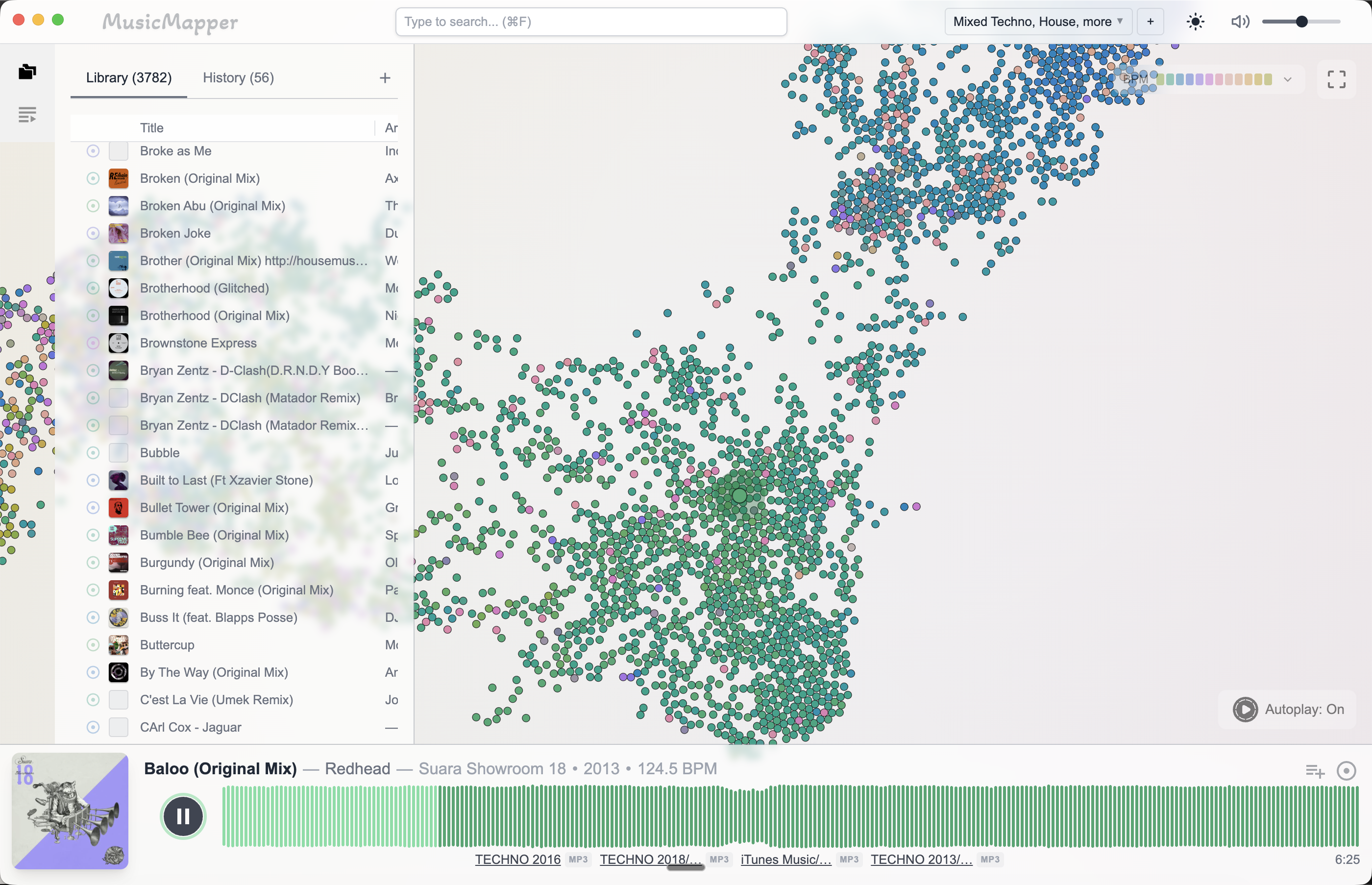
The moment where the two tools stop competing
Picture the first half hour of set prep.
You have one anchor track. Maybe two. You know the mood you want, but the set is still foggy. This is the part where folders and playlists can start to feel mechanical. You are not really preparing yet. You are still searching for the shape of the set.
That is where MusicMapper earns its place. It is designed to help you move outward from a track, find nearby matches, and rediscover songs in your library that belong in the same space.
Later, once the shortlist becomes clearer, the job changes. Now you care about order, playlists, preparation, export, and the gear-centered workflow you trust. That is where Rekordbox becomes the stronger environment.
If you already use Rekordbox, what actually changes?
Usually, the end of the workflow does not change very much.
You will probably still finish in Rekordbox if that is where you manage playlists, prepare exports, and get music onto the USB or into the hardware workflow you already know. That fits Rekordbox's own positioning on its feature overview, where export, performance, and device-centered workflows sit at the center of the product.
What changes is the earlier part:
- less digging through folders to remember what fits
- less relying on memory alone
- more time spent comparing real options around an anchor track
- a faster path from "I know the vibe" to "this is the shortlist"
That is the real value of MusicMapper for a Rekordbox user. It does not try to make the final stage disappear. It makes the path into that final stage more creative and less heavy.
The simplest way to think about it
Rekordbox helps you finish the set.
MusicMapper helps you find it.
That sounds simple, but it is the difference that matters most in practice.
What the handoff looks like
This only works if the handoff is real.
Based on the current MusicMapper product and changelog, the handoff can happen in two practical ways:
- a Rekordbox XML bridge so Rekordbox can browse MusicMapper playlists
- copy-to-folder export with an optional M3U playlist
Rekordbox also documents XML-based playlist import and related developer workflows in its official developer documentation, which is why this handoff is more than a vague "export somehow" story.
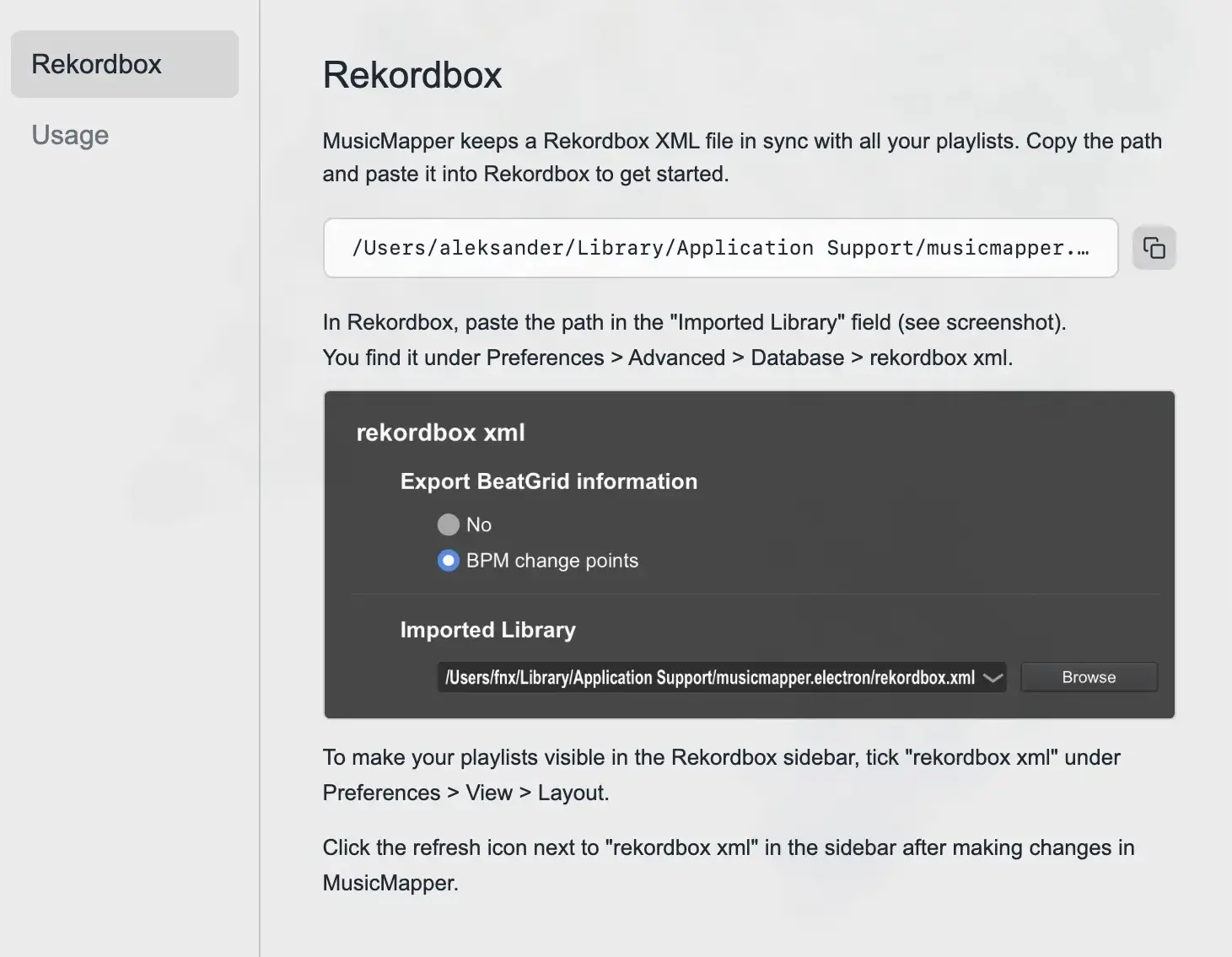
So the likely workflow for many DJs is straightforward:
- Start in MusicMapper with one strong reference track.
- Build a shortlist by exploring matching tracks and rediscovering good options.
- Sync or export that shortlist into Rekordbox or the next playlist stage.
- Finalize playlist order, export, and move toward the actual performance setup.
What each tool feels like when you use it
| Moment in the workflow | MusicMapper | Rekordbox |
|---|---|---|
| You only have one or two anchor tracks | Feels exploratory and fast | Can feel like you are managing before you have decided |
| You want to find matching tracks from a local library | Strong fit | Possible, but less discovery-first |
| The shortlist is already clear | Useful, but less central | Strong fit |
| You need export and gear-oriented preparation | Not the main strength | Strong fit |
The important point is not that one tool is better at everything. It is that they reduce friction at different moments.
Choose MusicMapper if the pain starts before export
MusicMapper is the better fit if your frustration sounds like this:
- "I have the music. I just cannot surface the right tracks quickly enough."
- "My collection is big, but I keep falling back on the same familiar corner of it."
- "I want to explore by sound and feeling, not only by folders and metadata."
- "The hardest part of prep is building the shortlist, not exporting it."
Stay with Rekordbox at the center if the pain starts at the end
Rekordbox stays central if your frustration sounds more like this:
- "I need reliable USB export for the gear I play on."
- "I want one environment for preparation and performance."
- "My workflow depends on Pioneer or AlphaTheta hardware compatibility."
- "Execution and export matter more to me right now than discovery."
The more realistic story is MusicMapper with Rekordbox
Imagine you are building a warm-up set from a large local collection.
Inside Rekordbox alone, you can absolutely get there. But the first part of the session can feel like work before the idea is ready. You are sorting, checking, moving between lists, and trying to remember where the right tracks are.
If you begin in MusicMapper, the first part feels different. You can move around a reference track, listen for close neighbours, make a few intentional jumps, and collect strong candidates quickly. Once the shape of the set becomes obvious, Rekordbox becomes the place where you tighten it up and prepare it for the way you actually play.
That is why the pairing makes sense. MusicMapper helps you arrive at a better shortlist. Rekordbox helps you finish the job.
If you want the practical version of that handoff, read How MusicMapper fits into a Rekordbox workflow.
Limitations and tradeoffs
This is only helpful if the tradeoffs are clear.
- Rekordbox covers far more of the total preparation-to-performance workflow.
- If USB export, hardware compatibility, and performance features are the center of your setup, MusicMapper will feel incomplete on its own.
- MusicMapper is more focused, which makes it stronger for discovery and weaker if you want one tool to do everything end to end.
- Rekordbox is broader, which is powerful later in the workflow but can feel heavier in the moment when you simply need to find the next right track.
Final recommendation
If your main goal is to prepare, export, and perform inside a familiar club-oriented ecosystem, keep Rekordbox at the center.
If your main frustration is that your library has become harder to explore and harder to turn into a strong set idea, add MusicMapper earlier in the process.
For most DJs, that is the most honest answer:
- MusicMapper is for finding matching tracks and shaping the shortlist
- Rekordbox is for finishing the playlist and getting it ready to play
If you want to go deeper, the next useful reads are How to find matching tracks in a large local DJ library, How to prepare a DJ set from your local collection, and MusicMapper vs Serato for DJ track discovery.
Explore MusicMapper
See how the workflow looks on your own music library.
MusicMapper helps you explore a local collection as a visual map, preview similar tracks quickly, and build playlists for sharper set preparation.
Frequently asked questions
Can MusicMapper replace Rekordbox completely?
For most DJs, no. If you rely on Rekordbox for USB export, Pioneer or AlphaTheta workflows, or performance preparation, you will probably still keep it in your setup. MusicMapper is more useful earlier in the process, when you are trying to find the right tracks and build the playlist.
How does MusicMapper fit into a Rekordbox workflow?
The practical flow is to use MusicMapper to find matching tracks and build the shortlist, then move that playlist into Rekordbox. MusicMapper currently supports a Rekordbox XML bridge and copy-to-folder export with an optional M3U playlist, so the handoff can happen before the usual Rekordbox and USB stage.
What will most Rekordbox users actually do with MusicMapper?
Many Rekordbox users will still finish inside Rekordbox, especially if they depend on club-standard export workflows. What changes is the earlier part of the process, where MusicMapper can make track discovery and playlist building faster.
Keep Reading
Related articles
Guide
How MusicMapper Fits Into a Rekordbox Workflow
MusicMapper works best before Rekordbox, not instead of it. Use MusicMapper to find matching tracks and shape the shortlist, then move that playlist into Rekordbox for final preparation, export, and performance.
Guide
How to Find Matching Tracks in a Large Local DJ Library
When a DJ library gets large, the problem is rarely a lack of good music. The real problem is surfacing the right tracks fast enough. The easiest fix is to stop treating discovery as a folder problem and start treating it as a listening and relationship problem.
Comparison
MusicMapper vs Serato for DJ Track Discovery
Serato and MusicMapper solve different parts of the DJ workflow. Serato is strongest when the job is live performance, controller use, and DVS-oriented execution. MusicMapper is stronger when the job is discovering matching tracks, rediscovering your library, and building the shortlist before performance.